Hexagon Measurement SystemsNo matter what Hexagon measurement equipment or software you use, we want to hear your ideas and suggestions on how we can improve.
Thanks for your assistance in helping us shape the future. |
|


 Make it possible to re-enumerate feature numbers after program is written/edited.
Your program is finished but some points or features were added and their out of numerical order.
A Re-number feature would put them all in ascending order.

Save the PC-DMIS version/SP/Schema so that we can identify what version of PC-DMIS is needed to open this file.
Can we get some way to record what version/schema of PC-DMIS is required to open a particular PC-DMIS file? With the rolling cutoff and some users having a mix of schema for their routines, I fear difficulties with using the migration utilities in the future.

Add UPR as smart parameter in the measurement strategy editor
As more and more customers are asking us to scan (with a probe) all features, they also got their standards for using the filters in scanning. In those standards, they also ask for a specific UPR which relates to the current diameter. For example, Ø8 and smaller require a UPR setting of 15. Ø8-Ø25 require UPR 50 etc.
I'd like to add this as a smart parameter in the Measurement Strategy Editor to make sure we also use the correct settings.

Have the clearance cube wrap around the form of the part instead of a cube that has deadspace in it
This would save lots of time for some parts. Think of it like the shield from the Dune movies. The clearcube should form around the part

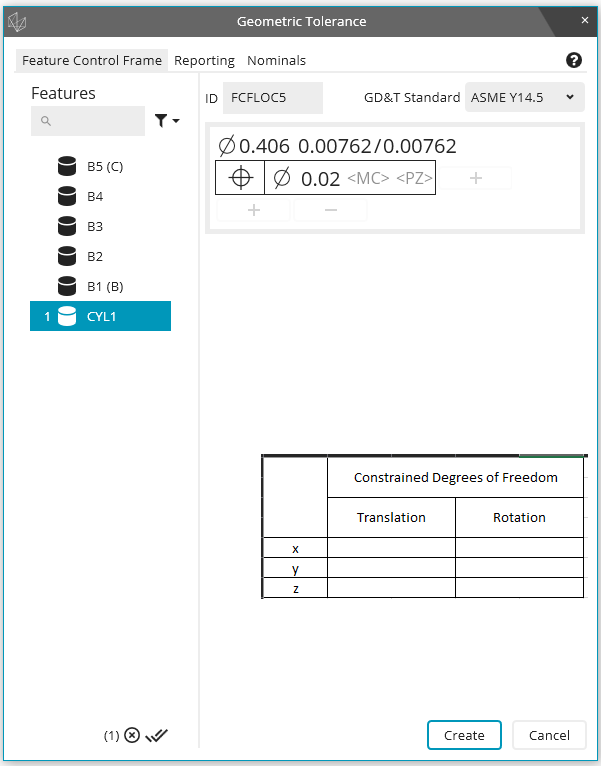
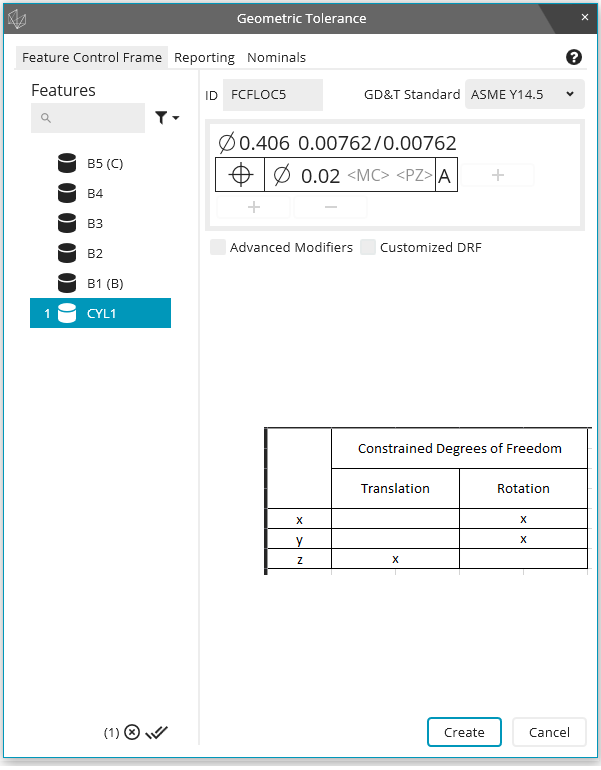
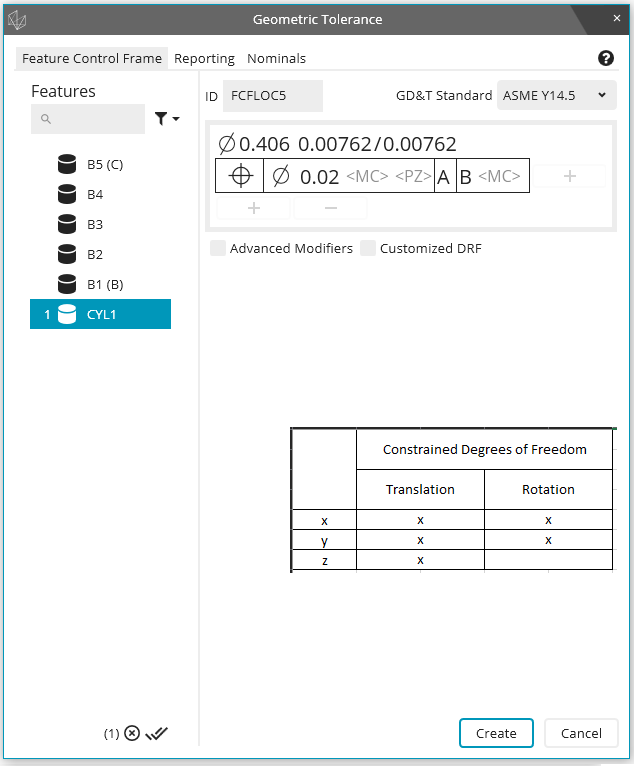
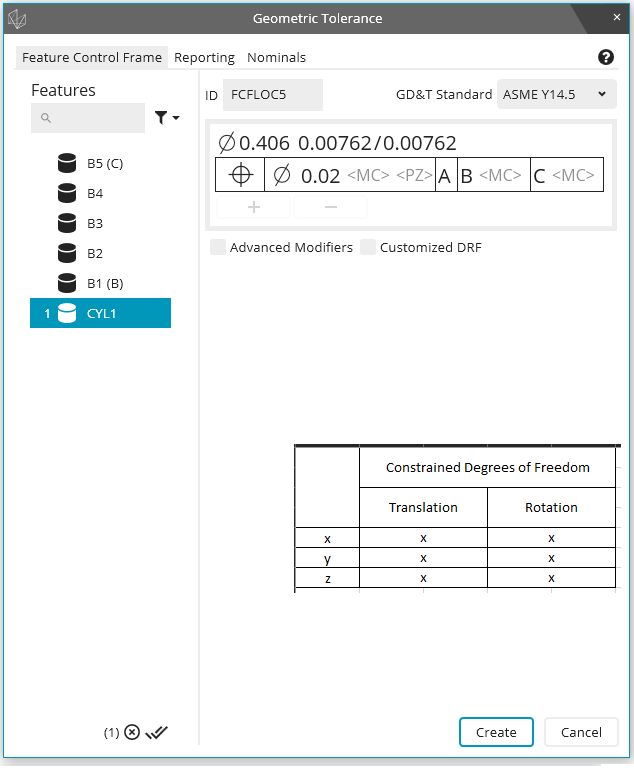
Show constrained degrees of freedom in the geometric tolerance dialog window
It would be helpful to see the actively constrained degrees of freedom as the feature control frame is being built in the geometric tolerance dialog window. As an example, assume I have a primary datum plane (normal Z+), a secondary datum cylinder (axis along Z), and a tertiary datum cylinder (axis along Z). Then, as I build my feature control frame, the geometric tolerance dialog window shows me which degrees of freedom become constrained as the images below show:
Ability to Assign a Dimension as Attribute
I would like the ability to create an attribute dimension, similar to a "Keyed In" dimension that has a non-numerical value of either "PASS" OR "FAIL" and the ability to pass that result to reports or Excel exports. Currently, all defined dimensions are numerical.

Complete autocalibration routine
Autocalibration Currently does not remeasure failed tips. My suggestion is to implement a feature within the Autocalibration routine that allows it to remeasure the tips that failed the standard deviation. As well as adding a feature within the autocalibration code that allows you to select the calibration sphere when the qualtool has been moved only. This would be used for all autocalibration within that code as well but only selected at the beginning of the program to ensure correct vector and size are used. My expectation if this gets implemented is when i leave on Friday, i can start the autocalibration routine and come back on Monday with no tips that have been outside of the standard deviations.

Gerber Format Support
The Gerber format is a standard ASCII format file structure and uses X, Y, Z and I, J, K information that enables data exchange between CAD (development) and CAM (production). It is primarily used in electronic CAD programs (EDA – Electronic Design Automation) to output layout data for printed circuit boards.
We are frequently confronted with this format and here we have a competitive disadvantage compared to providers who can read this format into their measurement software without further external conversion.
It would therefore be desirable to integrate a corresponding import interface into PC-DMIS.

Possibility to scale the size and change the color of type of Annotation Points
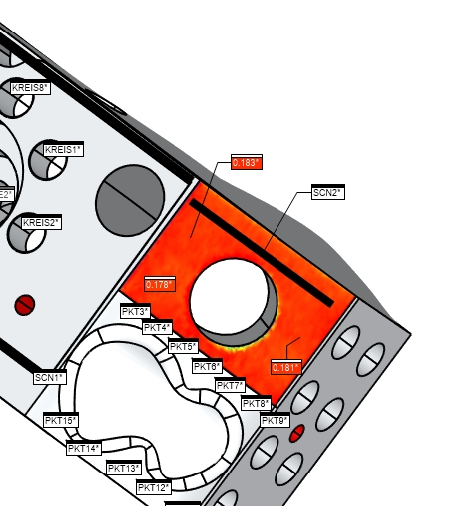
As a PC-DMIS User I would like to have the possibility to enlarge the size of Annotation Points created out of Surface colormaps or Pointcloud colormaps. Sometimes it is very hard to read the value inside of Annotation Points, because they are just too small. Sometimes it is hard to read because you do not have a nice contrast between the Type and the background color. In this case it would be nice if I could change the color of the type.
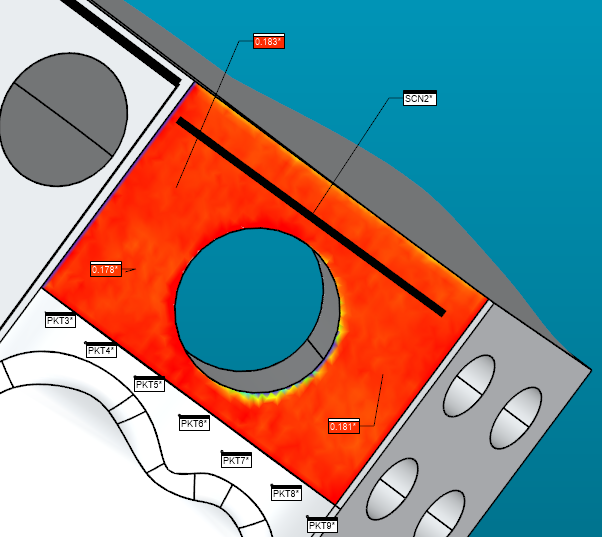
While in Graphic Window the Annotations are good to read, it may be more difficult in Reports, etc.

Add animation speed slider to lower of window for offline play back
Servicio de atención al cliente por UserEcho

