Hexagon Measurement SystemsNo matter what Hexagon measurement equipment or software you use, we want to hear your ideas and suggestions on how we can improve.
Thanks for your assistance in helping us shape the future. |
|


 Change the generic feature creation to include a drop down selection of previously measured features
Change the generic feature creation to include a drop down selection of previously measured features such that you could select PLN1.TX - Cir2.TY - Line3.TZ and PLN1.X - CIR2.Y - Line3.Z to populate the new generic feature as you create it.

Error messages should begin with a distinct identifying alpha-numeric code to provide a simpler means of referencing them. Otherwise, some errors messages have similar text and can be confused.
Error messages should begin with a distinct identifying alpha-numeric code to provide a simpler means of referencing them. Otherwise, some errors messages have similar text and can be confused.

I would like to see the Live Image view so I can use INSPECT on a vision machine, and use the view to do the manual alignment features
At the moment, INSPECT is not very useful for Vision machines, as without seeing the camera view, then the manual alignment features are impossible to position.
Add the axis and workpiece temperatures to the "probe reading" window
It is often useful to know the temperatures of the axes and the workpiece in real time without having to call up the thermal compensation command.
PC-DMIS does not have a window that displays these temperatures in real time.

Confirm Tracefield pop-ups with the green check controller button
You can confirm most pop-ups with the controller, except for the Tracefield window. It's a small quality of life thing.

Warning if your tip combination is out of spec
I would like PC-Dmis to warn when defining a tip that is too heavy and also if it is outside limits of what the probe can handle.
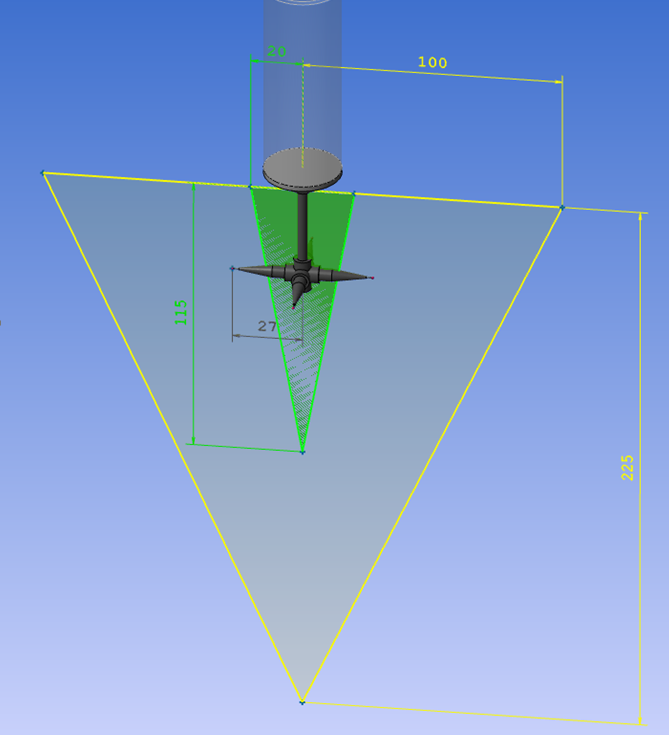
Below a tip that is outside the specific volume for an HP-S-X1S. But inside an HP-S-X1H
The weight of the tip is 15.4 grams, so it can handle the weight of both probes but not the size and position of an HP-S-X1S.
HP-S-X1S: max 20g
HP-S-X1H: max 33g

Enable viewing of summary mode and command mode at the same time.
It would make it easier to follow the program and edit directly in the code at the same time

Improve "Seach Path" with a "Group" field.
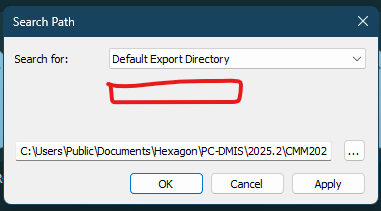
Add a Seach Path "Group" field. I support programing for multiple sites and vendors off/online. Setting up a "group" search path would be a great help. Option to imbed search path in the program routine may be nice as well. Things get messy with 12+ sites/vendors. I can switch sites multiple times in a day.

3D Connexion Space Mouse
Allow/Enable the Compatibility of the 3D Connexion Space Mouse (CAD Mouse)

Customer support service by UserEcho

