Hexagon Measurement SystemsNo matter what Hexagon measurement equipment or software you use, we want to hear your ideas and suggestions on how we can improve.
Thanks for your assistance in helping us shape the future. |
|

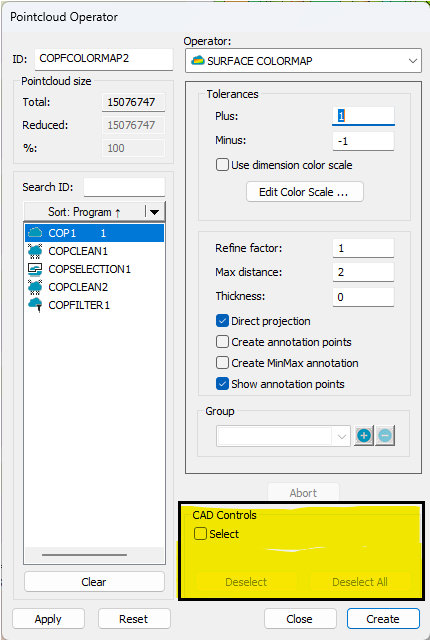
 Select funktion
Hi
In recent years, there have been more and more customers manufacturing plates for hydrogen fuel cells or heat exchanger with have many small CAD surfaces (thousands of surfaces). If you want to mark a certain area, you need to zoom in and mark from different angles to cover everything. This takes an enormous amount of time!!!
So I would like to have more options when selecting CAD surfaces. Like, select all, select all in my selection (through/not through/visible only and so on.

enhance search function for groups (part 2)
Could the Find function in Command Mode be edited as is proposed in the original topic from Aaron Baldauf?https://hexagonmi.userecho.com/communities/40/topics/1335-enhance-search-function-for-groups
With that I mean is to add a checkbox for if you want to search inside groups or not.
The reason:
We have very large programs with lots of groups.
When I for instance do a search for "D20H7_" (in version 2025.1) it takes alot of time. If it is within a group it will expand the group. When I click next it will expand the next group. Et cetera.
Groups that are expanded via this Find keep expanded. So I need to do extra work to search manually for expanded groups that were collapsed.
I already talked to Hexagon and they proposed the search function in Summary Mode, but that is very different and not suffcient to my needs.
Plus, I, like so many others, program in Command Mode because I don't want to hoover over a line to get all info like in Summary Mode.
So please make it as proposed by Aaron Baldauf, with a checkbox "Find in groups".
Unchecked = Search as in version 2022.2
Checked = Search as in version 2025.1, and when it expands a collapsed group that when it leaves that group it will collaps it again.
Thanks.

Input comment text size setting, especially when using full screen input comments
I'm currently developing Pc-Dmis programs to be used in production. We typically have operators that run parts on up to 4 cmms each - they're performing setup (no manual measurements), loading parts, following prompts and printing reports only. We utilize bar code / 2d matrix scanners, and when the operators have to enter data into an input comment either manually or with a scanner they cannot easily see the text that has been entered. We use full screen input boxes for user input. I do have some programs that have forms, but I am currently the only programmer at our facility that knows how to create them. Would it be possible to add a text size control (full formatting would be awesome, just like on the forum I'm using now) to input/comment dialog boxes?

Quick Features - path line graphics
When using Quick Features, Path lines do not display direction, start/end points for Cylinders. Using Auto Features (Cylinders in this case) does. This is a reason for me not to use Quick Features currently but, if these were shown graphically, just like they do for Auto Features, I would be more inclined to use them. (Quick Feature - Cylinder - TOP, Auto Cylinder - BOTTOM)


Allow evaluation of angularity and perpendicularity vs 3 datums and MMC/LMC modifier to said datums with ISO1101 settings
Hi PC-DMIS team and users.
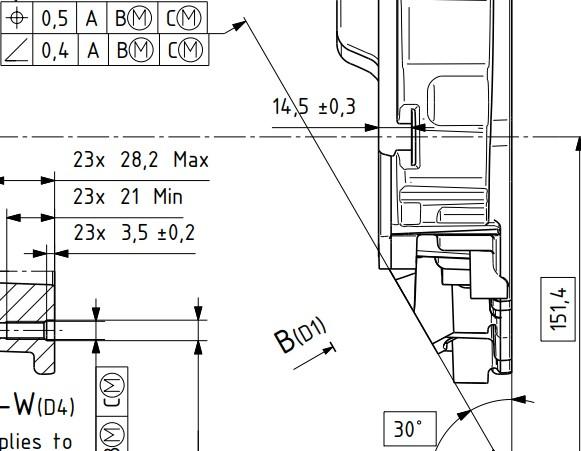
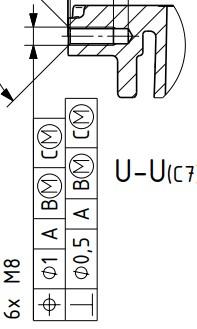
I have time to time encountered requirements that call out for angularity and perpendicularity versus 3 datums. Since PC-DMIS currently doesnt allow this, i have researched about it with my local PC-DMIS provider (Hexagon Sweden) and my employers ISO experts, who are part of the ISO committee. According to both Hexagon Sweden and the mentioned ISO experts, both perpendicularity and angularity, although not very clearly described in ISO1101 currently, are fully intended to be used with a complete datum system such as A B C, which is confirmed with the people who participated in writing the current version of ISO1101.
It is to my understanding that this would be equal to, or very similar atleast, to be using surface profile with a complete datum system but with the OZ modifier applied. This is my current workaround when i see such requirements on flat surfaces. But when the requirement applies to a bore
or a shaft, this workaround no longer works and i have no proper way to do it.
In addition to implementing a change like this, a yellow text warning, similar to the warning text to [DF] modifier could be used as soon as the 3rd datum is defined. Where the text implies that a 3rd datum for angularity and perpendicularity is not clearly described in ISO1101, and also asks the user to consider if this is really the intended requirement for the feature, or something along those lines.
In addition to this, bring back the ability to add the LMC and MMC modifier for the datums used for the angularity/perpendicularity evaluations. There is nothing stated that prohibits this in current standards. It is allowed for surface profile with OZ modifier, so after all, why shouldn't it be allowed to be used for angularity and perpendicularity.
If you need any further clarification or explanation, im happy to fill in. Thanks!
Below are 2 example pictures from the same technical drawing.

Report template: When is it possible to insert the scan on the 3D CAD with the individual points (T-difference) also in the report as a 3D image with the deviations visible?
It is also possible to click on individual points and have the deviation displayed directly in the report.

Add mark used and global used as parameter set options for Auto Calibrate
Add Mark used and Global used as parameter set options for Auto Calibrate.
Doing this could eliminate the possibility of forgetting to update the Parameter set when the tips used in a measurement routine is updated.
Path Lines Shortcut Key
Function of ALT+P, or another shortcut key, to turn path lines on for highlighted code instead of all instead of having to right click to select

Transform the CAD
Add more tools to easy manipulate the CAD; Sometimes I get the Model with crazy angles, and it is too complicate to transform it

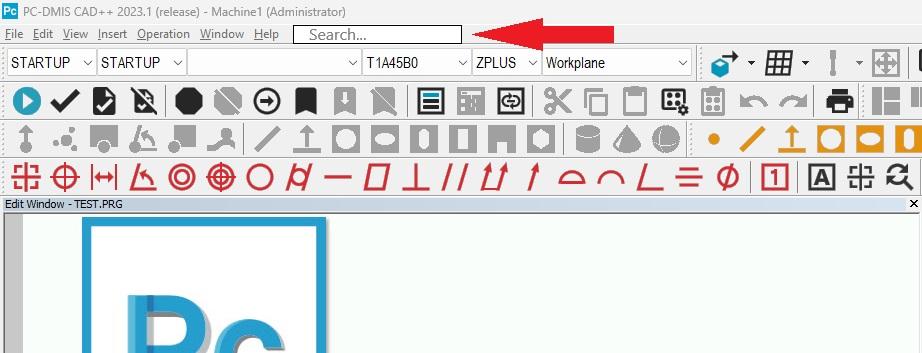
Search bar for settings
Add a search bar for settings at the top of the software.
I can't tell you how long I have had to search for Excel Form Report, analysis, screen capture to file, etc.
خدمة دعم العملاء من خلال UserEcho