Hexagon Measurement SystemsNo matter what Hexagon measurement equipment or software you use, we want to hear your ideas and suggestions on how we can improve.
Thanks for your assistance in helping us shape the future. |
|


 cad model transparent
Hi guys
it would be nice to be able to make certain regions transparent. For example: fixture model transparent, workpiece visible
have a nice day

USING HELP
With version 2019 the help (F1) is accessible trough the browser. My experience is very bad. The search is slow, opening is slow too. I just can not use it, it is unusable!!! Make it fast and simple like it was before.
Stop Universal Updater offering pre-release builds
Universal Updater offers me Pre-Release versions of PC-DMIS 2019 R1. I do not want them! Make an option in Universal Updater to enable or disable pre-release notifications for updates. I only want to install final releases

Enhance vision probe support - lighting
Vision Probing is great (for the most part). However it would be nice to see a smoother transition when programming between two dissimilar machines or even CMM-V. Problems with settings translating between different style light configurations can pose some strange difficulites. Mostly settings getting lost or hidden.
Example: Right now I have a single tier ring light, my customer has a triple tiered ring light. I write programs where in sections I turned the ring light off - when the program is transported to their system - it is on. I am told this is because their setup is different.
If this were a probing Cmm I would simply select a different module/tip etc and move on - right in the probe toolbox.
Open Template / Program Template Search Path
Very Simple Idea. \
Add a set search path option for 'Template Programs'.
Add to the drop down menu under 'Open' ; 'Open Template'.
This then drives to your set search path for template programs.


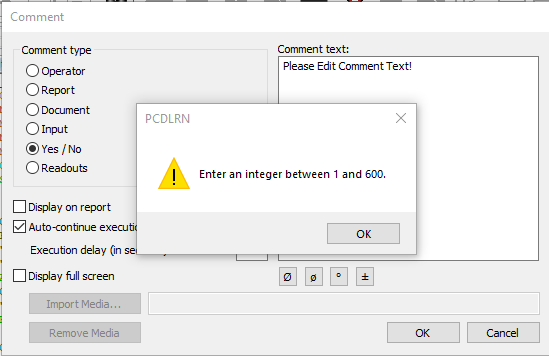
Comment Yes / No Auto-continue execution
Change the Comment Yes / No Auto-continue execution Default settings to be uncheck (Off).
Every Time I want to place a Yes / No Comment into the program I have too always uncheck the "Auto-continue execution". If I don't uncheck this check box I will get a Warning message "Enter an integer between 1 and 600" after selecting "OK".
Preview of the programs file path within the Recent Program List.
To see a preview of the programs file path by hovering over the menu item for the preview and file path appear in a large tile.

Collision Detection
Make the Collision Detection button active without first generating path lines. If I must generate path lines before running collision detection why not just make it part of the button click?

Could we add to Inspect configuration settings for PCDMIS behavior. For...
Could we add to Inspect configuration settings for PCDMIS behavior.
For example, PCDMIS visible/invisible
Also, I am finding that when running PCDMIS under inspect, it is modifying the PCDMIS layout. I am not sure whether it is Inspect or SlideShow that is doing so yet. Using Inspect 3.2. What I can see is that the Edit windows is closed, and all of the toolbars are cramped to the left side.
Сервис поддержки клиентов работает на платформе UserEcho

