Hexagon Measurement SystemsNo matter what Hexagon measurement equipment or software you use, we want to hear your ideas and suggestions on how we can improve.
Thanks for your assistance in helping us shape the future. |
|


 Collision Detection
Make the Collision Detection button active without first generating path lines. If I must generate path lines before running collision detection why not just make it part of the button click?

Mapped drives in win10
Dialog Save As or Open in win10 with 2018R1 doesn't work. PCDMIS doesn't see any network mapped drives or folder from Quick Access. Please fix that. because we cant work without that.

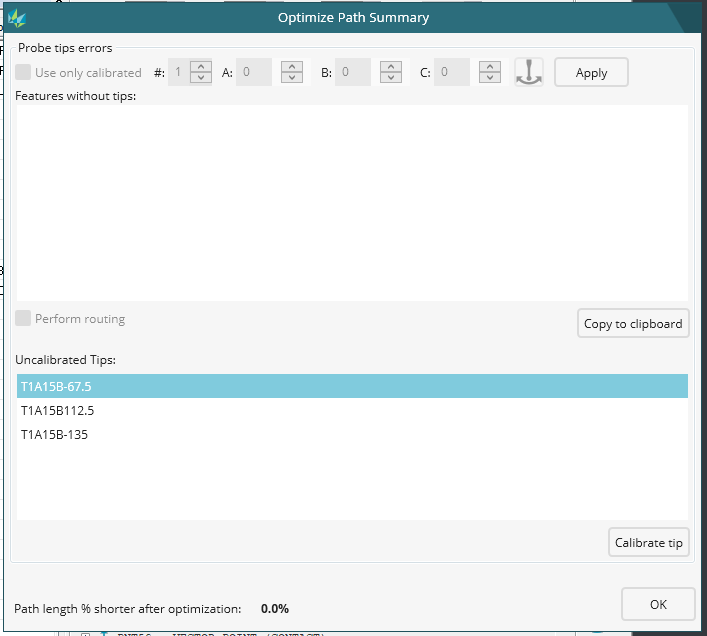
Optimize Path Summary Uncalibrated Tips
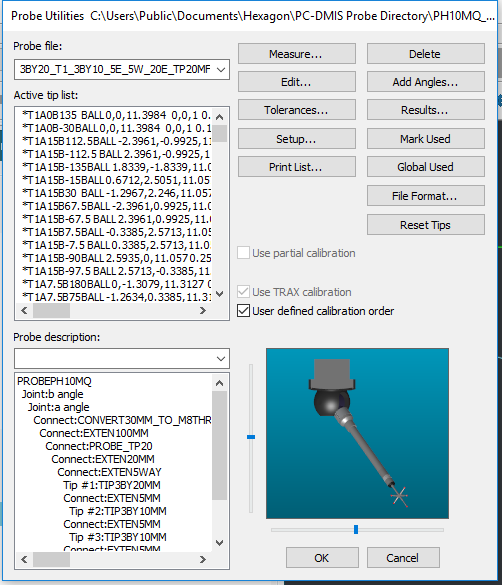
Optimize Path Summary will show a list of Uncalibrated Tips. Uncalibrated tips list shows all the uncalibrated tips used by the optimization. You can click on a tip and click Calibrate tip to open the Probe Utilities dialog box and calibrate the uncalibrated tips.
-
The problem is that the Tip that is selected in the Uncalibrated tips list will not be Highlighted in the Probe Utilities dialog box Active Tip list.
-
Selected the Uncalibrated Tip.
Selected Calibrate tip. Now Enjoy your search.

Add ISO286 tolerance choice possibilities (h5, JS6 etc) to new size window, like old location dimension
Add ISO286 tolerance choice possibilities (h5, JS6 etc) to new size window, like old location.
Actual we have a minor bug in 2017 R2 SP5 If we choice outer diameter 8 h5 in location first the minus tolerance appear positive. If we push create after the good negative appear in edit window and reopen the dialog we show negative too. But firstly show positive :-(.
Is new size type
analysis we need to type the tolerance manually. In these place would
be great if we can to input ISO 286 tolerance too...

for the Graphic view, it is better if there is one button to display the GRID
for the Graphic view, it is better if there is one button to display the GRID

Reporting
Hello my name is Daniel Ślosarczyk on pc dmis has been working for 6 years. I miss reporting cad models and cut models in the report. In addition, the report could be more intuitive to make quick screans (see reporting polyworks)
Multiple Pattern Names
When programming multiple features in order like:
CBORE_1
CBORE_DEPTH_1
HOLE_1
It would be nice if you could copy/paste with pattern this entire pattern and save the names of all not just have everything come up as HOLE_1, HOLE_2, HOLE_3...
Time consuming to rename all of the counter bores and depths.
Mesh
It would be nice if we can handle STL by surface mesh. Pointcloud is not usable...
Some youtube demo about pointcloud operation is also much better to help to our work.
Practical trick and tip etc...

Mulit Pc excel output
Have the Excel output work with any number of pieces into the same sheet.

Safety request by probe swivel,
When using executing program parts by CTRL + E, PCDMIS automatically swings to the last programmed probe position from the program.
Unfortunately alsothis position is skipped by an IF / GO command.
Here would be a safety requestion befor the swivel useful.
Service d'assistance aux clients par UserEcho

