Hexagon Measurement SystemsNo matter what Hexagon measurement equipment or software you use, we want to hear your ideas and suggestions on how we can improve.
Thanks for your assistance in helping us shape the future. |
|

 Allow theoretical numbers to be locked on individual features
 making it possible to prevent them from changing. This would give us a more elegant solution than turning a theoretical number into an expression by dividing by 1.

Create an actual model from a point cloud
I would like actually create surfaces based on a point cloud

Offer a multi-execute capability so you can get it to execute a specified Measurement Routine 'n' times
....like the MultiExecute Wizard can do.

PC-DMIS – Display Line Numbers in Edit Window (Command Mode)
Feature Enhancement Request – PC-DMIS Edit Window (Command Mode)
I would like to suggest adding an optional feature to display sequential line numbers in the Edit Window (Command Mode), similar to standard programming editors.
Suggested functionality:
- Display line numbers in a separate column on the left side of the program code.
- Automatically update line numbers when commands are added or deleted.
- Allow users to enable or disable line numbering in the Edit Window settings.
- Keep line numbers purely visual, without affecting the measurement program or its execution.
Benefits:
This feature would make it easier to navigate through long measurement programs, locate specific commands, troubleshoot issues, and communicate exact code locations between programmers and technical support.
Current situation:
In PC-DMIS 2026.2, I could not find an option to enable line numbering in the available Edit Window settings or context menu.
Thank you for considering this improvement for a future PC-DMIS release.

enlarge or resize distance window
Could the distance window could be enlarged or resizable, this would be easier to see more points to select.
So you don't have to scroll down and up every time.

Ability to share support cases between users of the same company
Ability to have a PC-DMIS customer case account manager allowing a team of users (same company) to access any Nexus case created by any user in the team. This would avoid double-submission of same issue by multiple users and increase visibility of known issues.

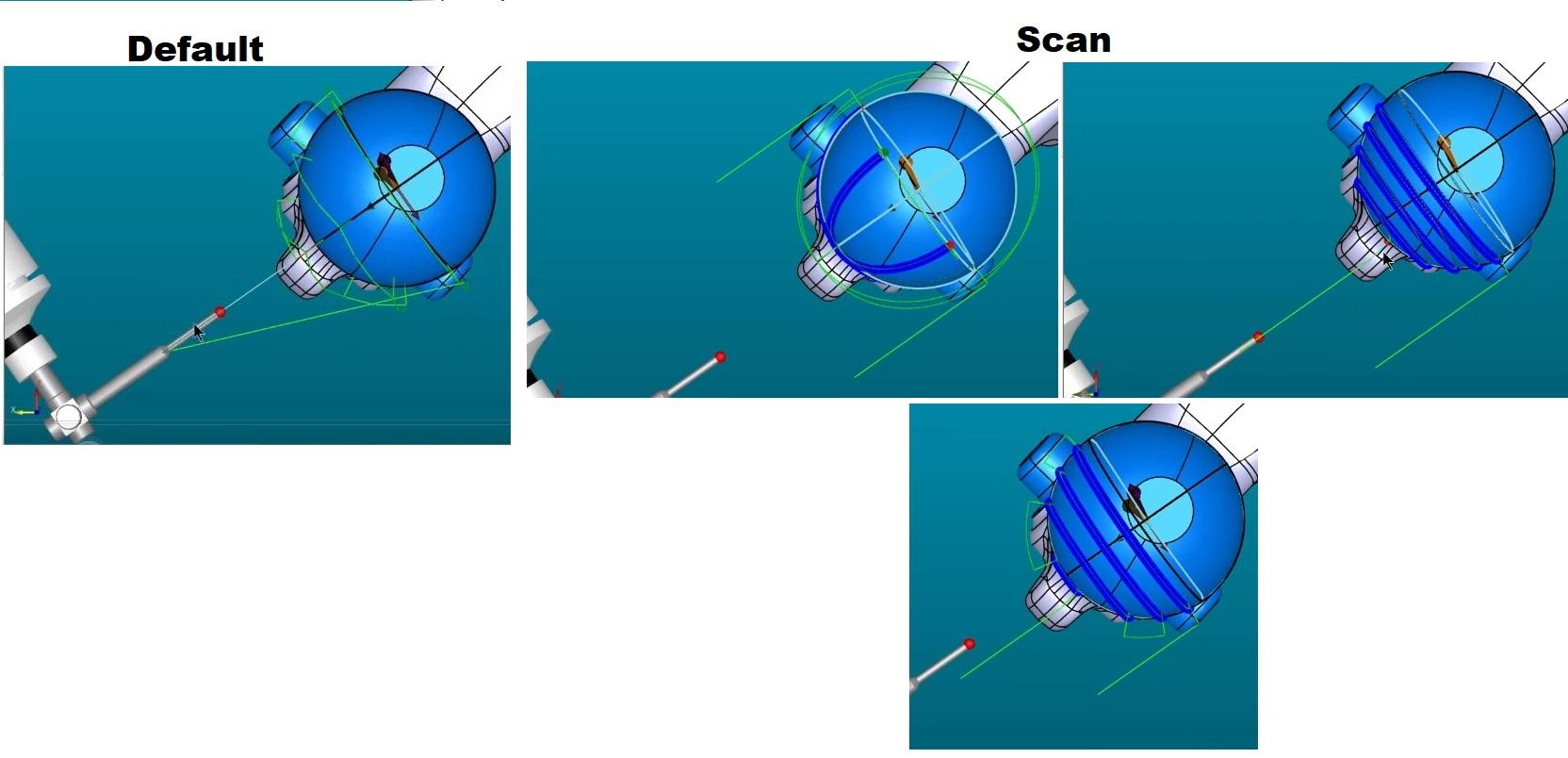
Sphere - Default Measurement Strategy - Avoidance move

Another good option would be to insert a picture from…
Another good option would be to insert a picture from camera (within Optiv machines) among report pages and due to that have an opportunity to see the part details
Few points to be added in Fusion
Hi,
as CMM programmer I would like to appreciate to have some more options in PC-DMIS Fusion reporting
Printing CAD report:
To have header on every page.
To hide some labels or to have an option to drag them to another report page.
If I rotate CAD on one page, it stays in this position on all pages. I would like to have different CAD positions within pages (each page different CAD position).
Evaluation of distance with both feature displayed (i.e. two points distance - I need to see related lines to both points, not just to one as it is)
I will probably add more points over time as I started to work with PC-DMIS Fusion
David

Enhanced Move Point Creation Along Surface Point Vector in PC-DMIS
I would like to submit a feature request for a future update of PC-DMIS. The goal is to improve programming efficiency and safety by introducing an option to create a Move Point directly along the vector of a selected point or surface.Currently, creating clearance or approach moves often requires manual coordinate calculation (\(X, Y, Z\)) or utilizing complex expressions to offset a position relative to a measured point. Introducing a native "Move Point Along Vector" feature would significantly streamline this workflow.
Proposed Functionality & User Interface Integration
- Context Menu / Dialog Option:
- When creating a
MOVE/POINTcommand, users should have a checkbox or dropdown option labeled "Along Vector" or "Offset by Vector". - Alternatively, right-clicking an existing point feature (e.g.,
PNT1) could offer an option: "Create Move Point Along Vector".
- When creating a
- Input Parameters:
- Reference Feature: The source point or surface from which the vector is derived (e.g.,
PNT1). - Distance (Offset): A positive or negative numerical value representing how far along the vector the Move Point should be placed.
- Positive value: Moves away from the surface (clearance/retract).
- Negative value: Moves toward/into the surface (approach).
- Reference Feature: The source point or surface from which the vector is derived (e.g.,
- Code Execution / Command Line Representation:
The command in the Edit Window could look similar to this:pcdmis
Kód používajte opatrne.PC-DMIS would dynamically calculate the absolute \(X, Y, Z\) coordinates based onMOVE/POINT, ALONG_VECTOR, FEATURE=PNT1, DISTANCE=50.0PNT1.X + (PNT1.I * 50),PNT1.Y + (PNT1.J * 50), andPNT1.Z + (PNT1.K * 50).
Key Benefits
- Increased Efficiency: Eliminates the need for manual math or writing custom expressions for simple approach and retract moves.
- Improved Safety: Reduces human error when calculating clearance points on complex, angled surfaces.
- Parametric Flexibility: If the nominal position of the reference point changes (e.g., due to a CAD update or alignment shift), the Move Point updates automatically because it is linked to the feature's vector.
- Cleaner Code: Replaces complex script-like workarounds with a clean, native PC-DMIS command.
Thank you for considering this request to enhance the offline and online programming experience in PC-DMIS.
Servicio de atención al cliente por UserEcho