Hexagon Measurement SystemsNo matter what Hexagon measurement equipment or software you use, we want to hear your ideas and suggestions on how we can improve.
Thanks for your assistance in helping us shape the future. |
|

 Animation of a part program should be more realistic
We should improve PC-DMIS form a graphical animation of a mesurement routine to a kinematic simulation. Then we can also check execution times and we can see also different speeds betwenn a move and a measurment inside of a feature.

Intervention limit for selected nominal dimension comparisons
Required: Define a separate action limit for each individual characteristic in the measuring program.
e.g: Characteristic 1 --> intervention limit 85%
Characteristic 2--> no intervention limit
Characteristic 3--> intervention limit 70%
Eingriffsgrenze für ausgewählte Nennmaßvergleiche
Es ist nur möglich eine Eingriffsgrenzen zu definieren (z.B. 80% oder 90%), die dann für alle Merkmale im Messprogramm wirksam ist.
Wunsch: Für jedes einzelne Merkmal im Messprogramm eine seperate Eingriffsgrenze definieren.
z.B.: Merkmal 1 --> Eingriffsgrenze 85%
Merkmal 2--> keine Eingriffsgrenze
Merkmal 3--> Eingriffsgrenze 70%

"Right click delete" to remove an unwanted Windows Layout icon
Deleting an unwanted Windows Layout icon should be more intuitive.
A user should be able to simply right click and choose "delete" in a context menu to remove, not Shift-Left Mouse Click and drag away. I'd also like to be able to rearrange the order the icons appear in the toolbar.

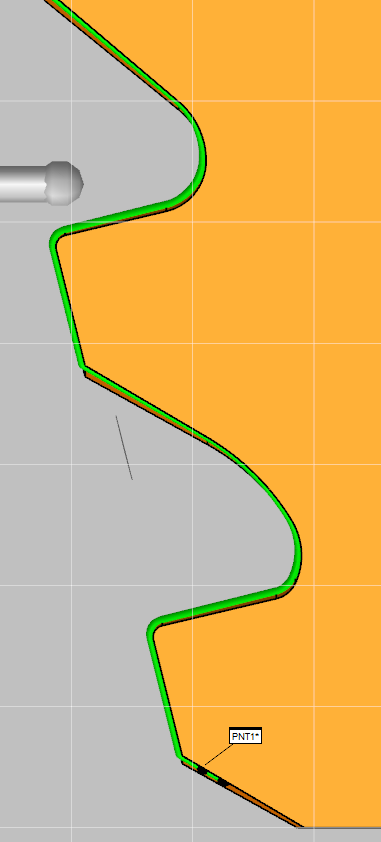
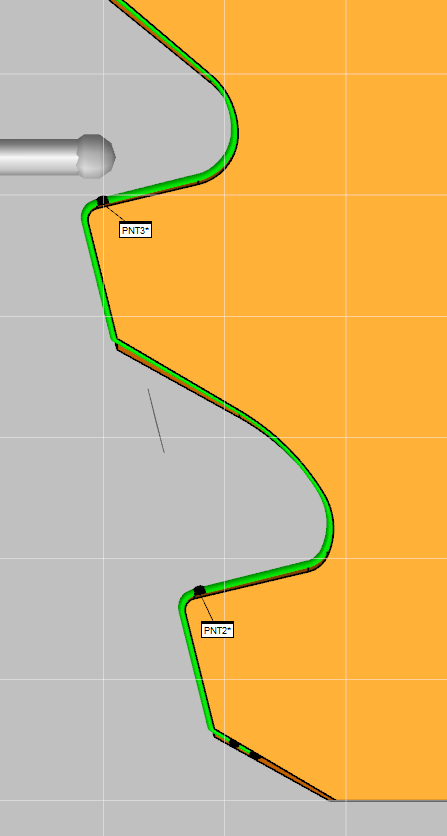
Intersection points between curve and plane
At the moment when you construct an intersection point between plane and curve only the first intersection point (PNT1) will be construct. (see Picture 1)
We are needed every intersection point between curve and plane (PNT2 and PNT3). (see Picture 2)

Collision Detection Speed Slide Adjustment Bar During Simulation

Warning message reminder to save Program
Add a setting in the Setup Options for a save reminder. If a program is opened for a while, you will receive an warning message reminding you to save.

QuickMeasure toolbar, make new sub icon menu
These openable icons are very useful. The new ones have been added, which is good. But I want to be able to create myself.
In this way;
- I get rid of the clutter.
- I gained from the area.
- I can make my own arrangements.
Update scan surfaces to new model
I want an easy way to be able to bring in a new model and tell PC-DMIS to equate the surface relation of previously created scans to the new model without having to go through each scan and deselect and reselect surfaces. For example, a model revision.

Actual value data point - file saving
Need to retain the actual data points on every measurement piece, after finishing the CNC run. This actual point data per piece will be useful for re-evaluate the dimension without actual part needed.

Could we implement a directory/folder rather than a PRG for program selection?
Some programs may have support files like pcdmis forms, basic scripts, bitmaps, external commands, etc. Very often, the best way to manage a program is to create a folder for it and then allow the program to reside within that folder with all its supporting files in same location.
This is because it is often impractical to have many programs in folders with all their support files intermix.
It would be nice to be able to specify whether to treat a folder as a program container that can be selected for execution. (On main Measurement routine screen). Bitmap association to it.
The rule would have to be that a folder name must be identical to the program name.
I know this is a complicated request. This is how one of our customers that has 50+ CMMs has his custom interface (developed by us Hexagon) configured.
Location of programs is remote (network).
Executing measurement routine is actually a local copy of the folder and its contents.
Servicio de atención al cliente por UserEcho