Hexagon Measurement SystemsNo matter what Hexagon measurement equipment or software you use, we want to hear your ideas and suggestions on how we can improve.
Thanks for your assistance in helping us shape the future. |
|


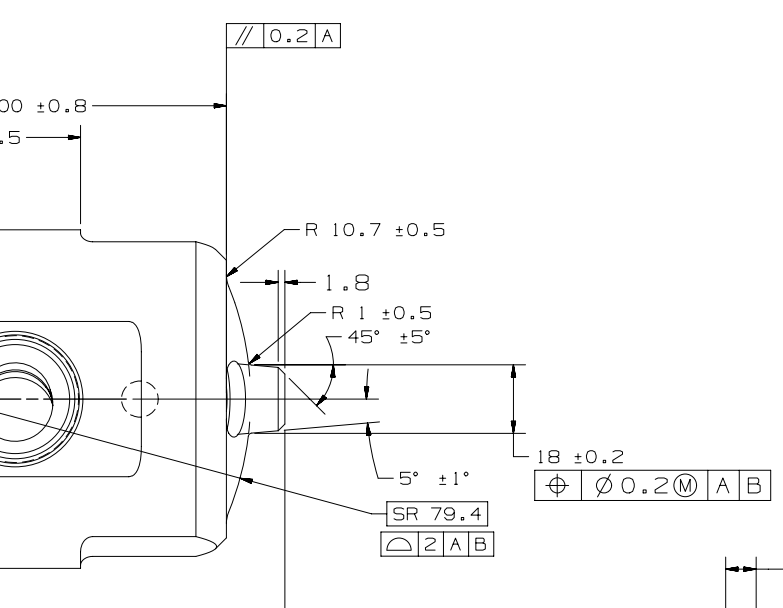
 In construct circle, need an auto cone to pierce an auto sphere and construct a circle where it pierces it
In construct circle, need an auto cone to pierce an auto sphere and construct a circle where it pierces it
Below shows the cone piercing the Sphericle radius to get the Ø18 (the Print is missing the diametrical symbol)

FBM (Feature Based Measurement) add as a Standard Module for PC-DMIS
FBM (Feature Based Measurement) should be added as a Standard Module. Currently this option is only available if your PC-DMIS license is programmed with the Feature Based Measurement module.
2022.1 Help file - Using Feature Based Measurement
The Feature Based Measurement (FBM) method is an optional feature in PC-DMIS. FBM functionality is only available if your PC-DMIS license is programmed with the Feature Based Measurement module.
FBM offers collision-free measurement of any dimension in a measurement routine.
Mini routines provide the user interface that enables you to execute a measurement routine that you create with the FBM method. Sub mini routines provide the facility to create the structure to measure tool-based, cell-based, and operation-based features from the measurement routine.
FBM is useful in situations where you want to do the following:
- Create a measurement routine for a complete, manufactured part and still be able to use the same measurement routine to measure the part, or a single feature, after each operation
- Quickly measure only selected features; for example, you may want to change tools on a fully-automated manufacturing line
- Run a partial measurement routine
For more information on FBM:
2022.1 Help file link
PC-DMIS User Forum link

Trace field dialog resize
When we use trace field for input general data about parts which we measure. Trace field dialog shows up on screen. Dialog can be resized only in left and right side, but it can't be resize for up-down?!. When we have a lot of trace fields we need to use scroll bar, and this is waste of time, and that is not very user friendly. Please make change and dialog that can be resized in both direction.

Reporting Distance Improvement for Auto_slots
Add the ability to add/ subtract widths/ lengths when reporting distance where a feature is an auto -slot. Currently we can only report to the center of the slot unless a lot of hoops are added. It's almost as common in my experience for a slot to be located to the edge instead of the center. Auto-slots are faster to code but are limited in reporting capability.

Allow different nominals in GeoTol TP than the ones used for feature creation
With GeoTol, you cannot change/use other nominals than the ones that were used for the creation of the feature. This is good, but are problematic at times.
For example, I have a part where I am using one alignment to measure the entire thing (using CAD). This is not a problem if all the features on the drawing is dimensioned according to this one alignment, finetuning the nominals (in essence, rounding them off) is not a problem and I can get the dimensions to match the drawing for easy orientation report VS drawing.
Now, for a section of this print, the alignment has rotated 15° and the dimensions are according to this rotated view. In GeoTol, I will not get the drawings dimensions, but the dimensions are recalculated from the previous alignment to this 15° rotated alignment, meaning that I have no way to adjust the nominals to match the print (can't round them off). My only option here is to measure them IN the rotated alignment and adjust (finetune/round off) the nominals when measuring in order to get the correct nominals in GeoTol and subsequently, the report.
Getting my point?
Would it be possible to be able to change the nominals in the GeoTol evaluation (TP in this case) to use in the evaluation - not affecting the features noms (in whatever alignment they were created)? This would help immensely in situations like these, or are there a more elaborate way to use as workaround?

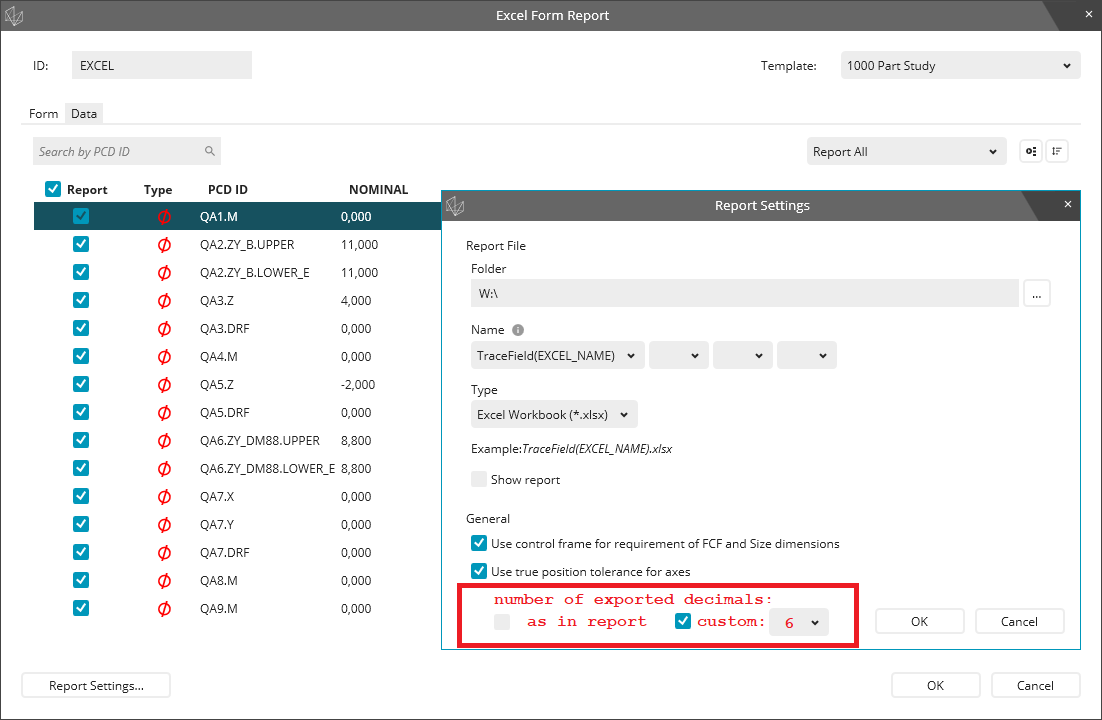
Excel Form Report - allow to change number of exported decimal places independent of report
Allow to change the number of exported decimal places independent of the report (see attached picture).
Or.. if this is too much to change -> force the excel export to always export at 6/7 (mm/inch) decimals.
This would allow to have an easy to read PDF/Print but still retain all the Data in the Excel Export.
At the moment if the PDF/Print is set to 3 decimals the export is also just 3 decimals.
This leads to PDF/Prints that are out of tolerance (shown red) but exports that are shown as in tolerance (wrongly)

I can't open the old version registered program in version 2021.2
I can't use the 2021.2 version because the programs made in the 2021.2 version of PCDMIS cannot be opened with the innovation that came in the 2021.2 version. I have a lot of prepared CMM programs. Translating them all into the new version will bring a lot of workloads. I don't know why such a feature was introduced, but there is no need to conclude a software maintenance agreement. What does the software team think.?

Add variable function (expression builder) direct to dimension window (dialog)
Now if we want to calculate dimensions, we have to do it in multiple steps. Make a dimension, create variable with functions or operations, create a construction point, and assigned variable to that point, and report the point.
It will be more elegant if you add a checkbox to dimension window to enable and add some functions & operators to the dimension (the expression builder). The expression builder would be integrated into separate tab on all dimensional windows.

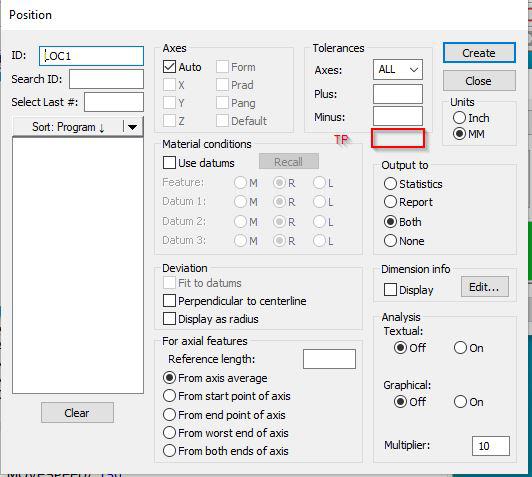
True position tolerance add on - In Use Legacy Dimension
Dear Team,
During the position tolerance callout, we don't have the separate column for position tolerance update . Instead of that every time we modifying in report callout.
In addition to +/- tolerance, if you provide the position tolerance column it would be very useful.
If any other method available in current state, please let me know.
Regards
Srinivasan N
Customer support service by UserEcho

