Hexagon Measurement SystemsNo matter what Hexagon measurement equipment or software you use, we want to hear your ideas and suggestions on how we can improve.
Thanks for your assistance in helping us shape the future. |
|


 Improving Program Traceability in PC-DMIS: Folder-Based Saving Strategy Inspired by PolyWorks
It would be a good idea to configure PC-DMIS so that each measurement program is automatically saved in its designated folder. This improves traceability and makes it easier to retrieve previous measurement sessions for review or verification. For example, if I need to revisit a measurement I performed a few days ago, I can quickly locate the corresponding program and results.
Technically, this can be achieved by setting a default save path in PC-DMIS, either through the software preferences or by using a startup script. This ensures that all programs are stored in a structured and consistent way, reducing the risk of file misplacement or overwriting. It also supports better version control and simplifies data management, especially in multi-user environments.
This kind of functionality already exists in PolyWorks, where the software automatically organizes measurement projects into predefined folders, making it easier to manage and access historical data. Implementing a similar approach in PC-DMIS would bring significant benefits to workflow efficiency and data integrity.

Add function to AUTO CYLINDERS
add ability to AUTO CYLINDER to generate TO CIRCLES similar to TO POINTS

Carry Like Tolerances Forward
There was a time of programming when I was asked to "Carry Like Tolerances Forward" and I clicked on "Don't ask me again" and since then, I haven't been. There have been multiple occasions since where that feature would be useful but I don't know how to get it back for new programs...

Point density via count vs per mm/in
The ability to simply plug in the amount of points i want for a strategy vs amount of pts/mm would be useful as to not plug in a number that bogs the software into eternity.
Python automated Properties/Criteria
I am currently able to automate the majority of our process. However, I am unable to write anything to the properties or criteria. When I check the recorder it says "Toggle Criteria Reporting - cannot translate". When I try to program it anyway it says its read only. We use it to measure the same shape over and over and it would be much easier and less time consuming to be able to modify the criteria and properties automatically.

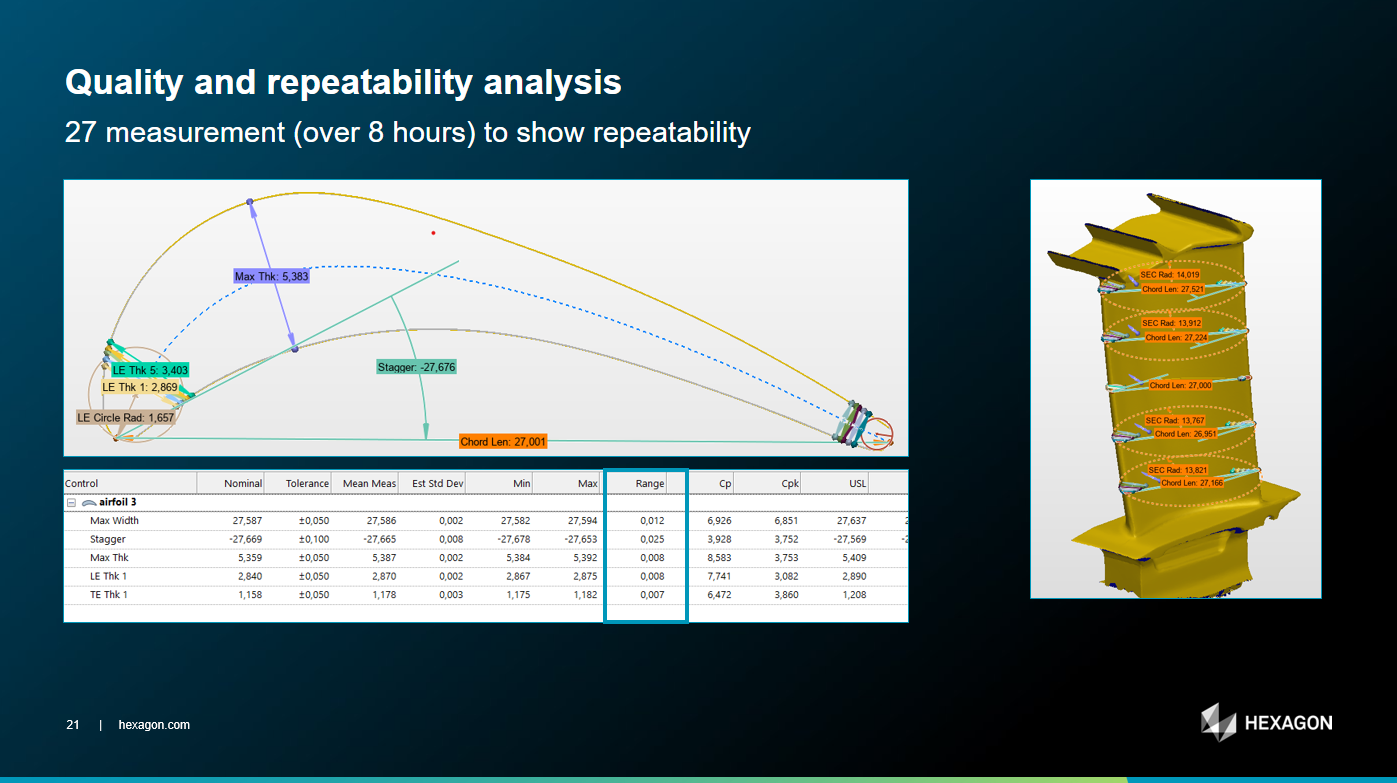
Blade Reporting / Analysis in Pointcloud Section View
Like Polyworks, have the ability to measure classic Blade Geometry within PC-DMIS COP Sections. Make this functionality native to PC-DMIS CAD++ and not require the use of BLADE module.
Slide image taken from SLS-PW plugin where Max Width, Stagger, Max Thickness, Chord Length, LE & TE Thk are all available.
There is huge business in the UK alone for Blade inspection using Laser sensors on CMM and on Portable Arms.

BUG: Sometimes the Pop-ups appear in the wrong position (Auto vector Point window)
Hello,
When using multiple monitors, the Auto Vector point window that opens for example disappears (appears in the wrong position somewhere) and is not visible on any of the monitors.
The only problem with this is that although I can close it if I immediately ESC it, d if I click somewhere in the model I am unable to close the Auto Vector window and so I cannot exit the program unless I close it in task manager by ending a task.
I think this might be a bug cause I am experiencing it in 2024.1 and also in 2024.2. It is solved if I reset the user in settings editor, but after a while it comes up again.
It would be great if the windows that open would only appear on valid monitors so if the problem could be solved.
Please register it in the bugs section. Thank you!

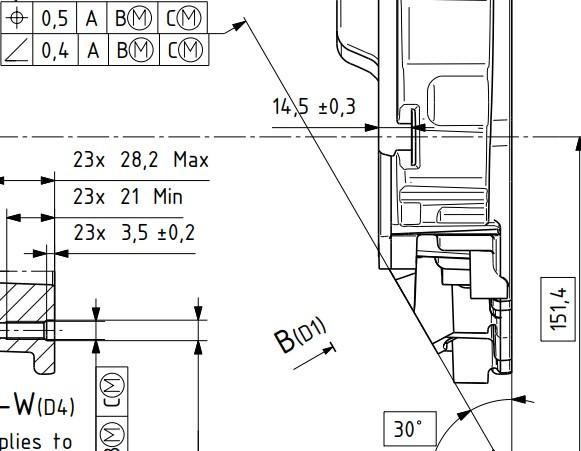
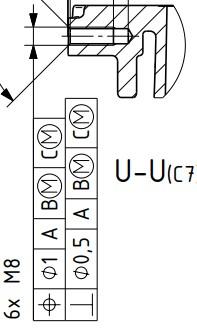
Allow evaluation of angularity and perpendicularity vs 3 datums and MMC/LMC modifier to said datums with ISO1101 settings
Hi PC-DMIS team and users.
I have time to time encountered requirements that call out for angularity and perpendicularity versus 3 datums. Since PC-DMIS currently doesnt allow this, i have researched about it with my local PC-DMIS provider (Hexagon Sweden) and my employers ISO experts, who are part of the ISO committee. According to both Hexagon Sweden and the mentioned ISO experts, both perpendicularity and angularity, although not very clearly described in ISO1101 currently, are fully intended to be used with a complete datum system such as A B C, which is confirmed with the people who participated in writing the current version of ISO1101.
It is to my understanding that this would be equal to, or very similar atleast, to be using surface profile with a complete datum system but with the OZ modifier applied. This is my current workaround when i see such requirements on flat surfaces. But when the requirement applies to a bore
or a shaft, this workaround no longer works and i have no proper way to do it.
In addition to implementing a change like this, a yellow text warning, similar to the warning text to [DF] modifier could be used as soon as the 3rd datum is defined. Where the text implies that a 3rd datum for angularity and perpendicularity is not clearly described in ISO1101, and also asks the user to consider if this is really the intended requirement for the feature, or something along those lines.
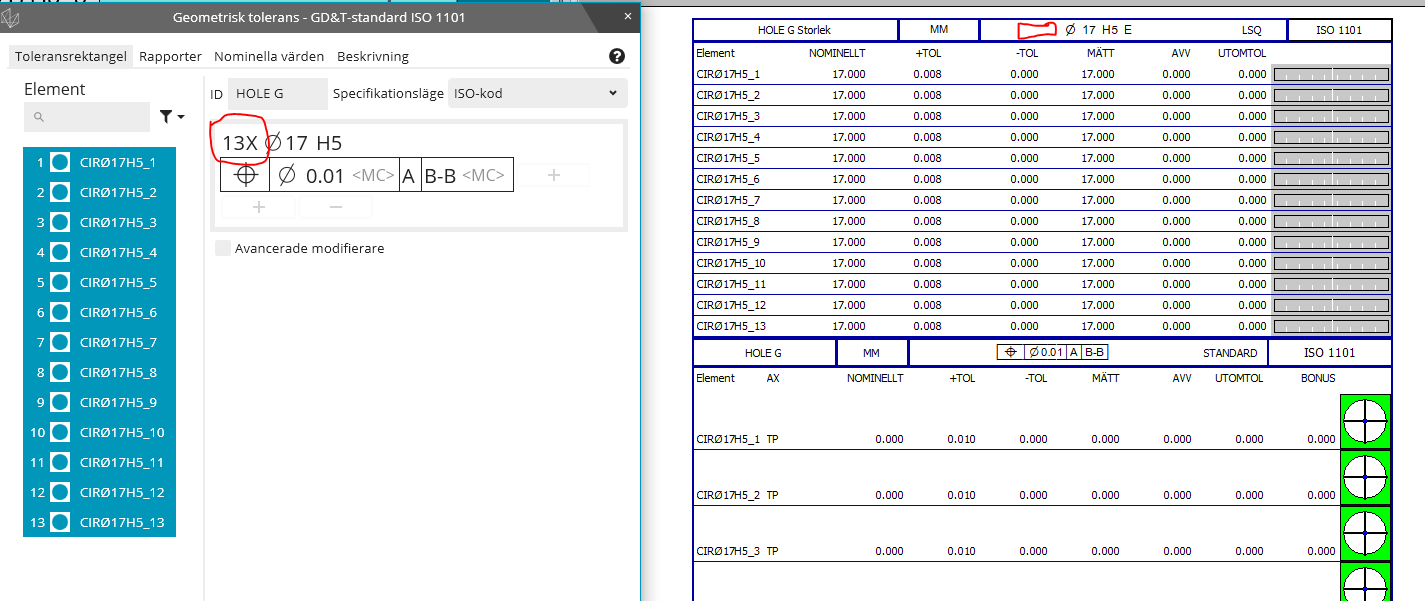
In addition to this, bring back the ability to add the LMC and MMC modifier for the datums used for the angularity/perpendicularity evaluations. There is nothing stated that prohibits this in current standards. It is allowed for surface profile with OZ modifier, so after all, why shouldn't it be allowed to be used for angularity and perpendicularity.
If you need any further clarification or explanation, im happy to fill in. Thanks!
Below are 2 example pictures from the same technical drawing.


Add Length of Cylinder to the Measurement Strategy Editor and Quick Features Widget
I want to be able to set the length in the Measurement Strategy Editor as well as in the Quick Feature Widget. If the length was included when copying parameters, that would also be helpful. It just seems like cylinder length has been disregarded. We use a lot of cylinders for our hole locations, and sorry to say but the void detection still makes the probe go down too far and it rubs the bottom face. Our threads also do not go the full length of the drilled hole depth, so void detection just doesn't work too well for these features.
Servicio de atención al cliente por UserEcho

