Hexagon Measurement SystemsNo matter what Hexagon measurement equipment or software you use, we want to hear your ideas and suggestions on how we can improve.
Thanks for your assistance in helping us shape the future. |
|


 Start program dialog
PCDMIS should have some customisable deafult run program dialog. For general data inputing before measurment starts, like Operator, machine, sample number, reason for measurtment, etc.
Those dialog shoud be changeable with some Scripting editor or throu some ini file.

Have the recent file menu show the last 10 programs executed instead of just the last 4.
Shouldn't be that hard to do. Lets get it done for 2017 guys.

Add values for assignments
It would be great to add .PA, .PR in extensions for hits, arrays (...)in assignments.

Allow theoretical numbers to be locked on individual features
Allow theoretical numbers to be locked on individual features making it possible to prevent them from changing. This would give us a more elegant solution than turning a theoretical number into an expression by dividing by 1.

Create an actual model from a point cloud
I would like actually create surfaces based on a point cloud
Allow combination of cylinder + width or circle + width for common datum in PC-DMIS
I want the combination of cylinder + width and circle + width to be allowed to be used as common datum. Currently it is not. According to ISO 5459 rules, this would be equal to be using the [DF]-modifier when the datums are separated. While using DF is fine, allowing the common datum combination removes the risk of unnecessary questions or discussions on how the final report should look, making the report mirror the requirement in the drawings.

Enhanced Move Point Creation Along Surface Point Vector in PC-DMIS
I would like to submit a feature request for a future update of PC-DMIS. The goal is to improve programming efficiency and safety by introducing an option to create a Move Point directly along the vector of a selected point or surface.Currently, creating clearance or approach moves often requires manual coordinate calculation (\(X, Y, Z\)) or utilizing complex expressions to offset a position relative to a measured point. Introducing a native "Move Point Along Vector" feature would significantly streamline this workflow.
Proposed Functionality & User Interface Integration
- Context Menu / Dialog Option:
- When creating a
MOVE/POINTcommand, users should have a checkbox or dropdown option labeled "Along Vector" or "Offset by Vector". - Alternatively, right-clicking an existing point feature (e.g.,
PNT1) could offer an option: "Create Move Point Along Vector".
- When creating a
- Input Parameters:
- Reference Feature: The source point or surface from which the vector is derived (e.g.,
PNT1). - Distance (Offset): A positive or negative numerical value representing how far along the vector the Move Point should be placed.
- Positive value: Moves away from the surface (clearance/retract).
- Negative value: Moves toward/into the surface (approach).
- Reference Feature: The source point or surface from which the vector is derived (e.g.,
- Code Execution / Command Line Representation:
The command in the Edit Window could look similar to this:pcdmis
Kód používajte opatrne.PC-DMIS would dynamically calculate the absolute \(X, Y, Z\) coordinates based onMOVE/POINT, ALONG_VECTOR, FEATURE=PNT1, DISTANCE=50.0PNT1.X + (PNT1.I * 50),PNT1.Y + (PNT1.J * 50), andPNT1.Z + (PNT1.K * 50).
Key Benefits
- Increased Efficiency: Eliminates the need for manual math or writing custom expressions for simple approach and retract moves.
- Improved Safety: Reduces human error when calculating clearance points on complex, angled surfaces.
- Parametric Flexibility: If the nominal position of the reference point changes (e.g., due to a CAD update or alignment shift), the Move Point updates automatically because it is linked to the feature's vector.
- Cleaner Code: Replaces complex script-like workarounds with a clean, native PC-DMIS command.
Thank you for considering this request to enhance the offline and online programming experience in PC-DMIS.

Warning if your tip combination is out of spec
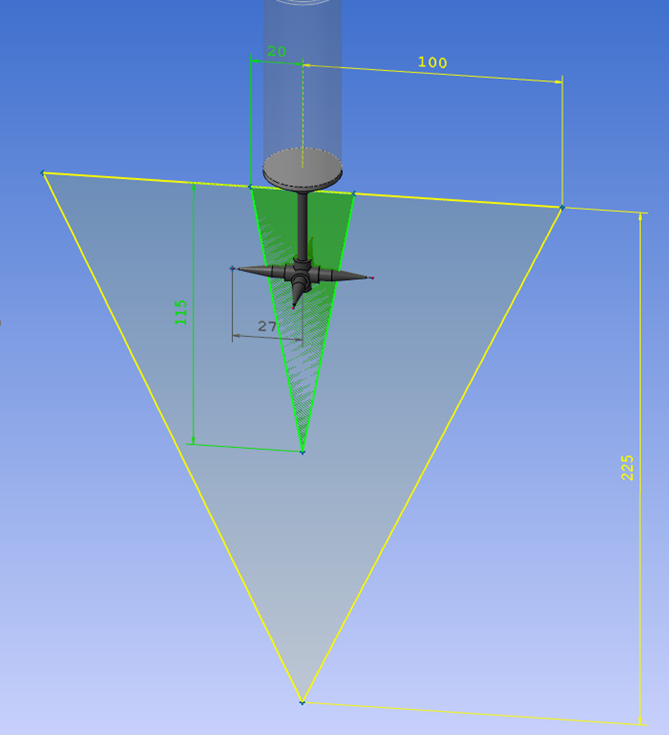
I would like PC-Dmis to warn when defining a tip that is too heavy and also if it is outside limits of what the probe can handle.
Below a tip that is outside the specific volume for an HP-S-X1S. But inside an HP-S-X1H
The weight of the tip is 15.4 grams, so it can handle the weight of both probes but not the size and position of an HP-S-X1S.
HP-S-X1S: max 20g
HP-S-X1H: max 33g

Automatic settings for UPR and cutoff wavelength
I absolutely love the automatic scanning parameters based on size/position/form in PC-DMIS. It's a set it, forget it thing for me. However, when it comes to the gaussian filter settings, things can get complicated. The general rule is that you need at least 7 points per undulation/wavelength. A lot of the literature talks about a given UPR/wavelength, and then changing the number of points scanned accordingly. However, the point density is automatically determined based on size/position/form, and you have little influence on the scanning path. The number of points therefore is set, and you need to change the filter settings accordingly. I use a little Excel sheet where I can enter the point density per millimeter that PC-DMIS has cooked up for me (you also need to enter the diameter for round features). The sheet will spit out the filter settings based on 8 points per undulation/wavelength (1 more than the minimum). This has worked very well for me, but it's a lot of work to set up for each feature. It's also easy to forget. Especially when scanning large diameters this can cause problems. Filtering a 500mm diameter with a point density of 6 with only 15 UPR is not ideal...
In summary: I'd love to see some kind of optional setting where you can change the filter strength based on the points per undulation/wavelength, rather than some absolute value that doesn't tell you anything without knowing the scanning density and diameter of the feature. 7 would be the minimum setting, to help prevent novices from filtering wrong. People like myself could set it to 8 and make it default. If you need a more aggressive filter, just increase the points per undulations/wavelength. Or just enter the UPR or wavelength manually, if that's your jam.

Option to Turn Off Results Going Red if Not Measured
Have a way to turn off the results going red if you do not measure them, so you don't have to remeasure the entire part necessarily to turn the other results back to black and not appear out of spec in red.
Kundesupport af UserEcho

