Hexagon Measurement SystemsNo matter what Hexagon measurement equipment or software you use, we want to hear your ideas and suggestions on how we can improve.
Thanks for your assistance in helping us shape the future. |
|


 Show measured items in live view of vision
I'd like the ability to graphically show measured features in the live camera view.
Possibly the ability to toggle them off and on in the graphics screen as an option to the edit feature appearance tab.

navigation search option for buttons and options in pcdmis
Many CAD software's have a search area to navigate to different options within the program. it is especially useful for new users and for icons that are not regularly used and much faster than clicking through the tabs searching for the right icon.

Insert a scan which learns the contour in auto feature
It would be very helpful if we could create an scan which learns the contour inside of an auto feature.
If we had an option like this, it should be very easy to create a scan and measure an feature which contur is not perfect.
Additional it is very easy to change the measurement from the default measurement strategy to scanning if you have to learn the contur.
We could use it for example at auto feature circle.

Create point map from profile hits in CAD window
Give the ability to create a point map from the CAD window showing the location of the Hit # from the profile dimension. My customers have a multiple surfaces with one profile call out so it makes it difficult to understand the surface without seeing where the hits are taken on the model.
Add a Debug option to PC-DMIS
It would be helpful if PC-DMIS had a Debugging tool for offline programming. This would allow ability to step through programs one command at a time to troubleshoot flow control. It would also be nice to see the values of assigned variables along the way.

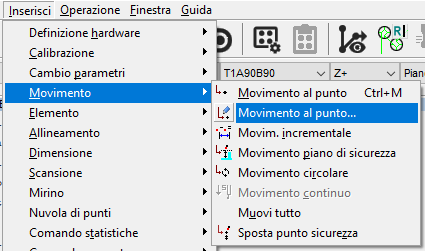
Bring back the old "move to point"
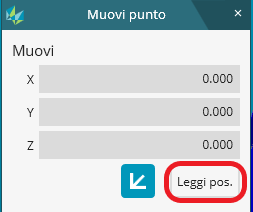
In offline mode, the "Move to point" function automatically moves the probe to the coordinates (x=0, y=0, z=0).
This makes it impossible to use the "Read position" option that was previously very useful when in need to read the position of the probe after having measured an element.
I hope I've been clear enough, my english skills are not the greatest.

ISO 1101 two-point measurements
Create two auto featurs and evaluation all individual points. The desired result would be the extreme dimensions.


Setup Options
Save settings as the default settings for different CMMs.
Possibility of calling the default settings at the beginning of the measurement program (One measurement program for different machines)

Separate dialog for Analog scanning
I'd like to see separate dialog boxes for scanning: one for TTP scanning and one for Analog. The way it is right now, we see all the settings for both in the same dialog: some applicable, some not. This tends to get a bit confusing.
For example, when setting up to do a Freeform scan with an analog head, I can still change density and number of hits in the Execution tab (then press calculate), but this has no affect on the scan since these settings are controlled in the Settings tab. Or, I could set the direction technique to "variable" when it should be set to "nullfiltier" for an analog scan.
Another option could be to gray out non-applicable settings.
I've noticed that the latest training material (2018) on scanning also lumps these two scan types together. It would be nice to have these totally separated in the curriculum since they are two very different animals.
Servicio de atención al cliente por UserEcho

