Hexagon Measurement SystemsNo matter what Hexagon measurement equipment or software you use, we want to hear your ideas and suggestions on how we can improve.
Thanks for your assistance in helping us shape the future. |
|


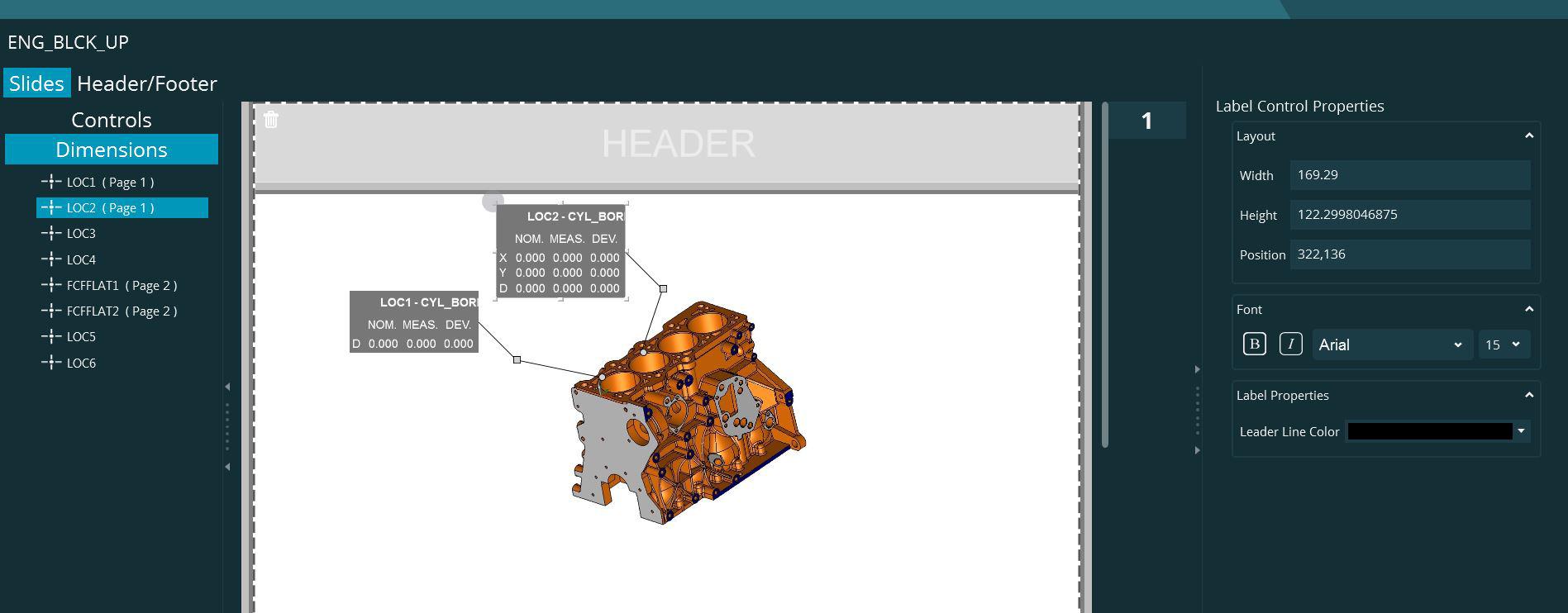
 SlideShow template creation - Allow for further customization of label (dimension controls)
SlideShow allows the user to grab any dimension from PCDMIS routine and annotate the slide with that element as a label control. However, it does not offer or allow for enough customization like PCDMIS STI+ did.
For example, say a dimension location that has XYD is selected. the control should allow user to only add D, or Y and D, etc. Instead of all dimensions. The label should allow us to specify applying color (Green, Yellow, Red) to percent of tolerance for any dimension. This could be via a background color for the label.
Suggestion for leader lines. Line color, End type Arrow or dot, relative to two features checkbox. If the dimension label is for a distance or an angle for example, leader line (relative to two features) could be made to point to two areas on screen.
Example screen capture of two Location dimension attached. It would be nice if user would see list at left showing available report axes and select the ones to show and use for label. When evaluating Green,Yellow, Red, only that dimension axes would be evaluated.

Playlist end of execution should show a summary containing all the measured items, not just the last
Seamless routines execution without summary screen confirmation after each routine.
Instead, one overall summary screen after playlist is executed.

your measurements
hello
I think it would be nice if you can see during your measurements whether something is right or wrong in enspect.
SQ Inspect 3.1 - Clear password field when user name field is cleared or typed over
Using SmartQuality Inspect 3.1 (install set from PCDMIS 2018 R1)
The password field is not getting cleared if a user clears the user name to enter a new one or types over it. I happen to have two SmartQuality users with the same password.
I can logout from one and actually type the other username and the password
field is still there uncleared from last user login. Press sign in and I am logged in.
We must clear the password field if anything is done to the user name one.

Have the option of making programs "Invisible" from Inspect Desktop.
If there is a large number of programs to load within a Directory, Inspect slows down significantly and sometimes crashes. If the only program to show was, searched for, program. This should prevent the system from slowing down.

Lock out programs or subfolders
Ability to lock out or block certain programs or programs within subfolders to keep other cmm operators from using these cmm programs.

See all messages from PC-DMIS to inspect!
When you have a form you can't see it in the pop up window in inspect,you need to hit next to go to the next step of the program.All the pop ups should be visible to know what to do.

Viewing Options for the Measure Tab Main View Area
I would like to include a details view, list view and contents view option for measurement routine files within the Measure Tab Main View area. Same concept as Windows Explorer.

Inspect Report
I would like inspect to have its own report window open when the program is finished or a simplified display showing the measurement results. Having to save to a pdf or excel file in PC DMIS and opening it in inspect has been very buggy so I don't use Inspect. A window popup like pc-dmis would be nice. The overlay that shows so many dimensions in and so many out but doesnt say which ones and by how much doesn't do a whole lot of good for anyone.
Similar to STI, have the ability to organize programs into subgroup catagories or folders.
Similar to STI, have the ability to organize programs into subgroup catagories or folders. This would greatly help cmm operators find a program quickly when there are hundreds of programs to select from.
خدمة دعم العملاء من خلال UserEcho

