Hexagon Measurement SystemsNo matter what Hexagon measurement equipment or software you use, we want to hear your ideas and suggestions on how we can improve.
Thanks for your assistance in helping us shape the future. |
|


 Datum modifiers for perpendicularity if datums are features of size
PC-DMIS doesn't allow datum modifiers for perpendicularity on features of size. we see this a lot and would like to see this capability added on.

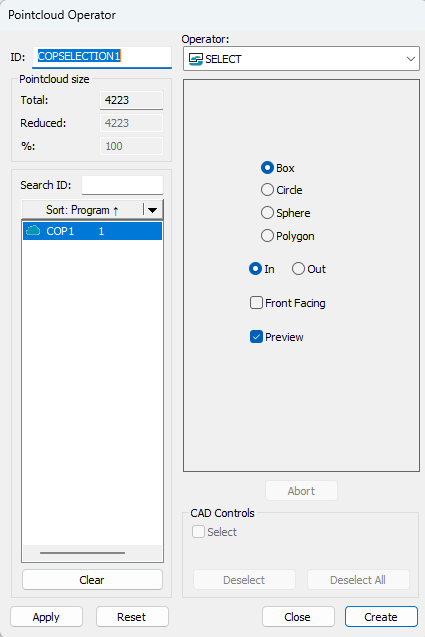
Pointcloud Operator (select funktion)
In select function menu I like to have a "multi select funktion".
So I don't need to reset the cloud every time I need several section.
Point cloud alignment
Customers who manufacture plates for hydrogen fuel cells or heat exchangers usually want their tool halves to be aligned according to the following principle.
1. The tool is aligned with a probe.
2. Then it is scanned with a laser (HP-L-10.10)
3. A Refine alignment is performed with the point cloud.
4. A primary plane is extracted from the point cloud.
5. Aligns as Z primary and Z zero.
6. Evaluates
However, this procedure is not correct as the plane is not exactly parallel to the pattern!
Of course, you can extract points and use these for XY and Z rotation, or construct "alignment features", but I want to use all the points in the pattern area in a easy way.
What I want is more possibilities in the point cloud alignment so that I can control/adjust my alignment better.

to points on all features
Can we have a 'to points' added on all features.
would be helpful.

Create a public API for automation of Inspect
Would like to have the ability to integrate external applications using Inspect API for process automations similar to what's available in PC-DMIS API options.

Improving Program Traceability in PC-DMIS: Folder-Based Saving Strategy Inspired by PolyWorks
It would be a good idea to configure PC-DMIS so that each measurement program is automatically saved in its designated folder. This improves traceability and makes it easier to retrieve previous measurement sessions for review or verification. For example, if I need to revisit a measurement I performed a few days ago, I can quickly locate the corresponding program and results.
Technically, this can be achieved by setting a default save path in PC-DMIS, either through the software preferences or by using a startup script. This ensures that all programs are stored in a structured and consistent way, reducing the risk of file misplacement or overwriting. It also supports better version control and simplifies data management, especially in multi-user environments.
This kind of functionality already exists in PolyWorks, where the software automatically organizes measurement projects into predefined folders, making it easier to manage and access historical data. Implementing a similar approach in PC-DMIS would bring significant benefits to workflow efficiency and data integrity.

Add function to AUTO CYLINDERS
add ability to AUTO CYLINDER to generate TO CIRCLES similar to TO POINTS

Carry Like Tolerances Forward
There was a time of programming when I was asked to "Carry Like Tolerances Forward" and I clicked on "Don't ask me again" and since then, I haven't been. There have been multiple occasions since where that feature would be useful but I don't know how to get it back for new programs...

Point density via count vs per mm/in
The ability to simply plug in the amount of points i want for a strategy vs amount of pts/mm would be useful as to not plug in a number that bogs the software into eternity.
Python automated Properties/Criteria
I am currently able to automate the majority of our process. However, I am unable to write anything to the properties or criteria. When I check the recorder it says "Toggle Criteria Reporting - cannot translate". When I try to program it anyway it says its read only. We use it to measure the same shape over and over and it would be much easier and less time consuming to be able to modify the criteria and properties automatically.
Service d'assistance aux clients par UserEcho

